


السوق المفتوح - OpenSooq
4.66.95K Reviews
App Specs
- Version
- 12.0.04
- Updated On
- License
- Free
- Downloads
- 10,000,000+
- Developer
- OpenSooq FZ-LLC
- Categories
- Shopping
- Platform
- Android, iOS
Screenshots



 Analysis by AppCompare
Have you ever found yourself scrolling endlessly through various apps trying to find the right place to buy or sell something nearby? I think السوق المفتوح - OpenSooq is most interesting when you treat it as a local classified marketplace rather than a conventional online shop. The key difference is that you are exploring listings from people and businesses in your country, then deciding whether to contact them and take the conversation further. That can make it useful for very different needs, from comparing cars to looking for a job, but it also means the quality and completeness of each listing matter a lot.
Getting Started with OpenSooq
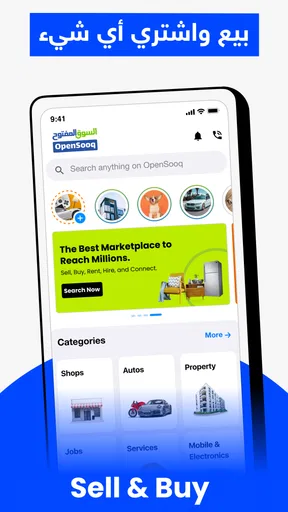
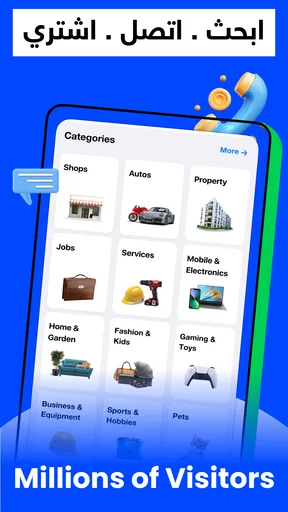
The moment you download السوق المفتوح - OpenSooq, you’re greeted with a clean and intuitive interface. It’s super easy to navigate, even if you’re not the most tech-savvy person out there. You’ll find everything neatly categorized, from vehicles and electronics to real estate and jobs. It’s like a virtual souq where everything you need is just a tap away. OpenSooq is a free shopping app from OpenSooq FZ-LLC, and its long-running presence is reflected in an average rating of 4.6 from around 603,000 ratings. The Everyone age rating also makes it broadly accessible, though the important decisions still come down to the people behind individual listings.
Its breadth is useful, but it changes how I approach the app. I wouldn’t open it expecting the predictable checkout flow of a retailer. I’d open it with a particular local search in mind, then use the relevant section to narrow the field. A person who needs a second-hand phone, a rental property, or a vehicle may all use the same app, but each search calls for a different level of checking before making contact.
Features That Stand Out
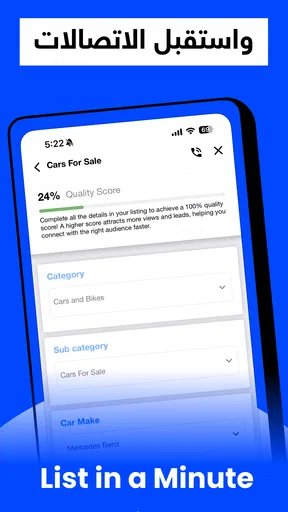
One of the first things I noticed was how user-friendly the app is. You can post an ad in just a few minutes. No need to jump through hoops or fill out endless forms. Just snap a photo of what you’re selling, add a description, set your price, and you’re good to go. Plus, the app supports multiple languages, which is a huge plus if you’re not fluent in Arabic.
For sellers, the quick listing flow is most helpful when the item is easy to describe and photograph. I’d take clear pictures in good light, include the details a buyer is likely to ask about, and make the asking price easy to understand. That bit of care can save time later: a vague post may attract messages, but many of them may simply ask for basic information that could have been included at the start. For a more complex item, such as a car or property, I would spend longer on the description rather than rushing to publish.
Another cool feature is the chat function. You can directly communicate with buyers or sellers without having to share your personal phone number. It’s convenient and keeps things a bit more private, which I definitely appreciate.
I’d use that conversation to establish the practical details before arranging anything: whether the item is still available, what condition it is in, and what kind of viewing or handover makes sense. Keeping early questions in the app is a sensible way to avoid sharing contact details too soon. Still, a chat is only a way to communicate; it doesn’t prove that a seller is genuine or that an item is as described. I’d keep a healthy level of caution and avoid treating a smooth conversation as a substitute for checking the listing in person where appropriate.
Worth Reading Before You Choose

Flipboard Shows What News Apps Must Do Beyond the Feed

Switching to Android Auto Means Rethinking Your Driving Routine

Google Calendar Makes a Crowded Week Easier to Manage

Ludo King Makes the Most of the Minutes Between Plans

Baby Panda World Brings Quick Play to Modern Phones, but Its Game Library Feels Busy

ESPN’s Live Game View Makes Following Close Games Easier
Browsing and Buying
Browsing through listings is a breeze. You can filter results based on your preferences—price, location, or even specific keywords. This makes the buying process so much more efficient. I found myself spending less time searching and more time finding exactly what I wanted.
The most useful habit is to narrow a search in stages. I’d start with the item or service and a realistic location, then use price and keywords to reduce irrelevant results. If the first search is too specific, it can hide useful alternatives; if it is too broad, the volume of listings becomes tiring. I’d loosen one filter at a time when results are sparse, rather than abandoning the search or assuming there are no suitable options.
It also pays to compare listings rather than judging one in isolation. For a used device, look at how clearly the seller describes its condition and whether the photos answer basic questions. For a vehicle or home, the stakes are higher, so I’d treat the listing as a starting point for questions and an inspection, not as a final guarantee. The range is a real strength, but a marketplace with many kinds of listings asks the buyer to do more of the evaluation than a store with standardized product pages.
And don’t even get me started on the variety! Whether you’re looking for the latest iPhone or a cozy apartment, OpenSooq has got you covered. It’s like having a classified section of a newspaper but way more comprehensive and accessible.
That comparison also explains when I’d choose a different option. If I want a new product with a familiar checkout process, clear return terms, and the same item sold by established retailers, a conventional shopping app is usually a better fit. If I want to compare local offers, contact a seller directly, or search across categories such as property and jobs, OpenSooq’s classified approach makes more sense. It is not a replacement for every kind of shopping; its value is in bringing local listings together in one place.
Safety and Security
In terms of safety, OpenSooq takes several steps to ensure a secure experience. They have a team dedicated to monitoring fraudulent activities and suspicious listings. While you should always be cautious when dealing online, it’s reassuring to know that the app is looking out for you.
I’d still make my own checks before committing. Ask focused questions, compare the answers with the listing, and be wary if someone pressures you to decide before you have had a chance to inspect what is being offered. For higher-value purchases, I would arrange a sensible way to view and assess the item before paying. The useful distinction is that platform monitoring can help, but it cannot remove the need for buyer judgement in a person-to-person marketplace.
A realistic use case is someone furnishing a new place on a limited schedule. They could look for local furniture, compare a few listings by location and price, and message sellers to ask about availability before planning a pickup. That is more convenient than checking separate sources one at a time. The trade-off is coordination: listings can change, replies may take time, and the buyer needs to confirm the important details before making a trip. I would not assume an item is reserved just because I have sent a message.
There is a similar distinction for job and property searches. OpenSooq can help surface opportunities in the same local marketplace as goods and vehicles, which is handy if you are exploring several needs at once. But I would not rely on a short listing alone for a major decision. I’d use it to identify leads, then verify the terms and details directly with the relevant person or organization.
Who Benefits Most from a Local Classifieds App
I think the best fit is someone comfortable comparing offers and speaking directly with sellers. If you regularly search for second-hand goods, want to advertise an item, or need a single place to browse local vehicles, real estate, electronics, and jobs, the app’s range is a practical advantage. Sellers may also appreciate having a straightforward way to put an item in front of people already browsing that kind of local marketplace.
It is less suitable for anyone who wants every purchase to feel like ordering from a large online retailer. If you need standardized descriptions, a predictable checkout, or a simple route to return an item, I’d look for a retailer or specialist service instead. Likewise, a user who dislikes negotiation or arranging details with individual sellers may find the direct-contact style more effort than it is worth.
OpenSooq has been available since October 2013, and its current version is 12.0.04, with support for devices running Android 7.0 or later. It has passed 10 million installs, while its review count is around 6,900. The app itself is free to download, though in-app purchases are available, ranging from about 99 cents to just under 400 dollars per item. I would treat those optional purchases as something to inspect in context rather than assume they are necessary for simply browsing; anyone considering one should check its purpose and price in the app before deciding.
Final Thoughts
So, would I recommend السوق المفتوح - OpenSooq? Absolutely! It’s a fantastic tool for anyone looking to buy or sell items without the hassle of traditional methods. Plus, it’s free to download, so you don’t have much to lose by giving it a try. My recommendation comes with one qualification: go in ready to compare listings, ask questions, and make your own checks. The app can make discovery and contact easier, but the quality of the outcome depends on how carefully you handle each transaction.
If you’re tired of dealing with unreliable platforms or just want a more streamlined experience, OpenSooq is worth a shot. Happy buying and selling!
Pros
- User-friendly interface for easy navigation.
- Wide range of categories to explore.
- Localized for Middle Eastern markets.
- Free to download and use for basic features.
- Regular updates improve performance and features.
Cons
- Ads can be intrusive and frequent.
- Limited features without premium subscription.
- Occasional listing inaccuracies.
- Some users report slow customer support.
- Requires internet connection for full functionality.
FAQs for السوق المفتوح - OpenSooq
What is OpenSooq and how does it work?
OpenSooq is a comprehensive online marketplace app available on Android and iOS, designed to connect buyers and sellers. Users can list items for sale, browse a wide range of categories, and communicate directly via in-app messaging. It offers a user-friendly interface, making it easy to navigate and find exactly what you're looking for.
Is OpenSooq free to use, or are there any hidden charges?
OpenSooq is free to download and use for browsing and listing items. However, there are optional premium features such as highlighted listings and increased visibility, which come with additional charges. These features are entirely optional and aimed at enhancing your selling experience.
How secure is OpenSooq for transactions and personal data?
OpenSooq prioritizes user safety by providing secure in-app communication. However, transactions are typically conducted offline, so users should exercise caution and follow safety guidelines when meeting in person. The app also ensures data protection through encryption and privacy policies that safeguard user information.
What types of items can I buy or sell on OpenSooq?
OpenSooq hosts a wide variety of categories, including electronics, vehicles, real estate, jobs, and services. Whether you're looking to sell a used smartphone or find a new apartment, the app provides a platform for almost anything. It’s an ideal place for both individual sellers and businesses.
How can I ensure a successful sale or purchase on OpenSooq?
To ensure a successful transaction, provide clear and detailed descriptions of your listings, including high-quality photos. Communicate promptly and politely with potential buyers or sellers. Always meet in safe, public places for transactions and verify items before exchanging payment to avoid scams.


